Free NinjaTrader 8 PnL on chart: dollars and % at every stop and target
The Chart Trader order flags tell you how many contracts and what kind of order, but not how much money is on the line. This indicator puts a label next to every stop and target reading "(contracts) : ticks : $ : % of account": what you would make or lose if that order fills, in green for a profit and red for a loss.
It works with orders you place by hand and with ATM orders: you don't need an ATM at all. It only reads the account and never submits, changes or cancels orders. We built it because the community asked for it, to see at a glance what you're risking when you move your stop.
- 100% free
- Open source (MIT)
- Built by El Trader Financiado for the community
Version 1.0 beta · NinjaTrader 8 · .zip to import · also in the pack of all 11 · updated October 11, 2026
Install one language only: if you switch between English and Spanish, delete the ElTraderFinanciado folder first (Documents\NinjaTrader 8\bin\Custom\Indicators).
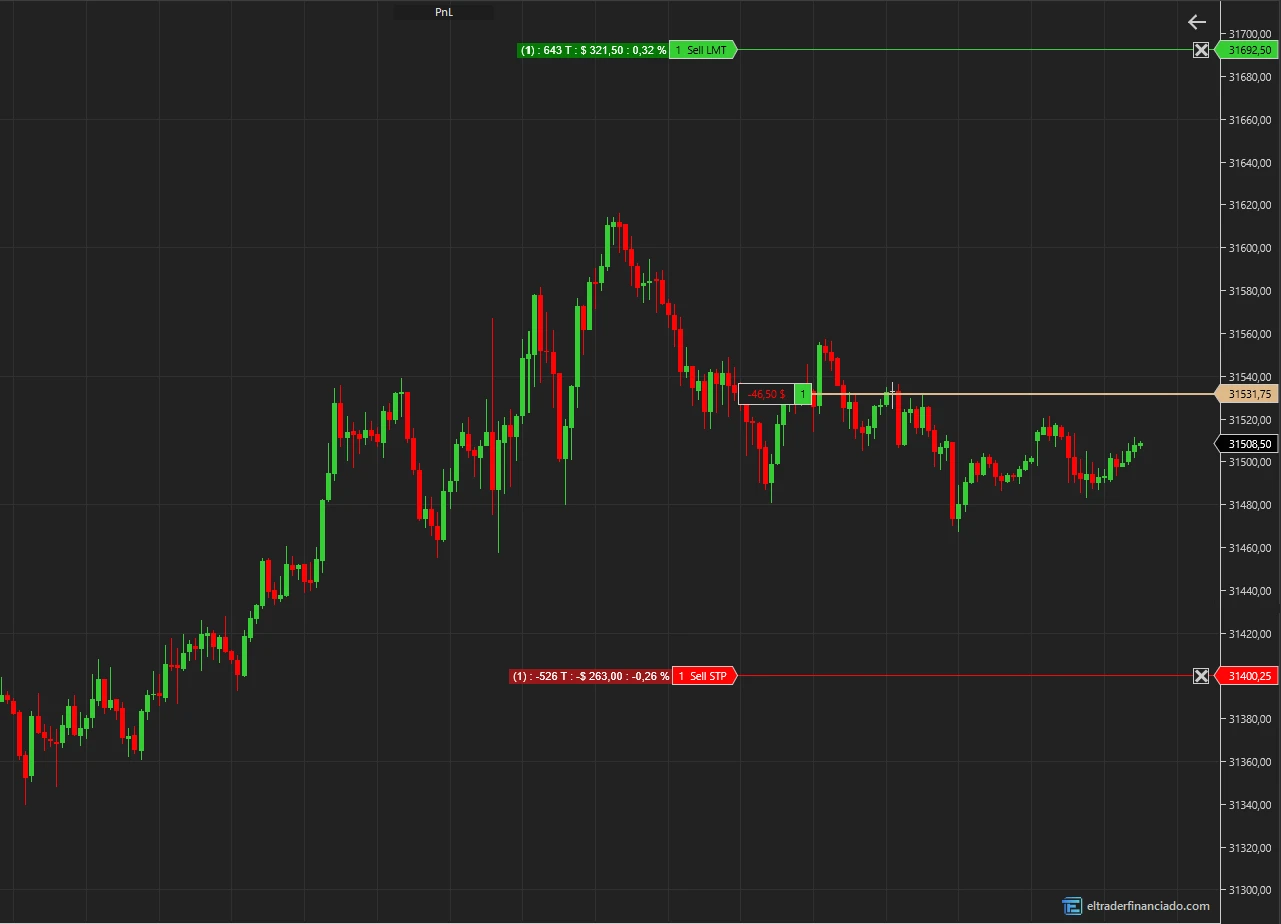
What the indicator draws
- Next to every order that reduces the open position (stops and targets, ATM ones too): contracts, ticks to the order, $ and % of the account if it fills. Green = profit, red = loss.
- Net of the round-turn commission from your account's commission template (or a manual one, or none, like the NinjaTrader flags).
- Pending entry sent with an ATM: a blue label with the risk (SL) and target (TP) of its brackets, added up.
- Optional, off by default: the open position PnL at the average price and the account's realized PnL for the day.
- Updates as you move orders and follows the account selected in the Chart Trader. Each part (contracts, ticks, $, %) can be turned off.
- A "PnL" button on the chart toolbar hides and shows it with one click.
How each label is calculated
$ = (order price − average price) × direction × contracts × point value, minus the round-turn commission. Short 1 MNQ with the stop 40 ticks away: 40 × $0.50 = $20 loss; with $0.62 commission per side the label reads -$21.24, and on a $50,000 account, -0.04%. The % is based on the account balance (or on net liquidation, if you choose it).
Ways to use it
The most common uses. Everything is set in the indicator properties.
See the real risk as you move your stop
Drag the stop to the next structure level and, when you let go, the label tells you how many dollars and what % of the account you lose if it's hit, commission included. Handy for staying inside your firm's daily loss limit.
Check an ATM before you're filled
With a pending limit entry sent with your ATM, the blue label shows the risk and target of all its brackets added up before it fills.
Scaling out
With several targets, each one gets its own label with its contracts. When the first one fills, the rest are recalculated with the contracts left.
Dollars only, or % only
Turn off the parts you don't use (contracts, ticks, dollars or %) to keep the label short, or move the labels to the chart edge with "Anchor".
Worth knowing
It's a beta. NinjaTrader doesn't publish where it draws its order flags: the indicator works that position out, and we tuned it with wide and narrow windows. If the labels don't sit right next to the flags with your setup, set "Anchor" to one of the edges. If the account has no commission for the instrument, it calculates without commission and says so in the Output window.
Key settings
| Setting | Default | What it does |
|---|---|---|
| Account | Chart Trader account | The one selected in this chart's Chart Trader, or a fixed account. |
| Stops and targets | On | Label next to every order that reduces the position. |
| Pending ATM entries | On | Risk (SL) and target (TP) of the pending entry's brackets. |
| Open position PnL | Off | Open PnL (ticks, $ and %) at the average price. |
| Today's realized | Off | Adds the account's realized PnL from NinjaTrader to the position label. |
| Commission | FromAccount | The account's (round turn), a manual one per contract and side, or NoCommission. |
| % based on | CashValue | Account balance or NetLiquidation (balance + open PnL). |
| Anchor | NextToFlag | Next to each order's flag or aligned to the left or right edge. |
How to install ETFPnL in NinjaTrader 8
- 1
Download the .zip and don't unzip it.
- 2
In NinjaTrader 8, from the Control Center: Tools → Import → NinjaScript Add-On… and pick the .zip.
- 3
Accept and wait for it to compile. If you had an earlier version, allow it to overwrite.
- 4
Indicators: on the chart, right-click → Indicators… → ElTraderFinanciado folder. Risk-Reward: right-click → Drawing Tools. Risk Guardian: Control Center → New.
Frequently asked questions
Do I need an ATM?
No. It shows next to any stop or target that reduces your position, whether you placed it by hand in the Chart Trader or an ATM did. The ATM is only needed for the pending entry label, because its brackets don't exist as orders yet.
Does it send or change orders?
No. It only reads the account and the orders; it never submits, changes or cancels anything.
Why doesn't it match the NinjaTrader flags?
The NinjaTrader flags show gross PnL. By default this one subtracts your account's round-turn commission; with "Commission = NoCommission" they match.
Does it work on prop firm accounts with Rithmic or Tradovate?
It reads whatever account NinjaTrader has, whatever the connection. We've tested it on Playback; if something looks off on your connection, send us a screenshot.
Can I watch another account?
Yes: under "Account" pick a fixed account instead of "Chart Trader account". Without that account's flags on the chart, the labels go in the flag column or are placed by estimate.
Trying it in a futures prop firm?
We have discount codes for the main evaluations. They are affiliate links: we earn a commission if you buy through them.
More free indicators

Risk-Reward
FreeA risk/reward box that sizes your position from your dollar risk, fills the Chart Trader quantity and sends the order with its stop and targets.

Risk Guardian
FreeAn AddOn that watches each account with your rules: daily loss, drawdown, contracts, trading hours and news. When a limit is hit, it flattens and locks until the next day.
The indicators describe what price has done; they don't predict what it will do and they are not investment advice. The risk management tools are an aid: they don't replace your firm's rules or your broker's limits. Only trade futures with money you can afford to lose.