Free risk/reward position sizer for NinjaTrader 8
NinjaTrader's built-in Risk Reward tool measures distances but doesn't tell you how many contracts to trade. This one does: draw your entry and stop, set how much you want to risk in dollars (or as a % of the account), and the box sizes the position, commission included, and writes it into the Chart Trader as you move it.
You can send the entry with its stop and targets straight from the box, or with your ATM. Move the box while you're in the trade and the orders follow it. We built it for our community because risking the same amount on every trade is what keeps a prop firm account alive the longest, and doing that math by hand on every trade is where most mistakes happen.
- 100% free
- Open source (MIT)
- Built by El Trader Financiado for the community
Version 0.7 beta · NinjaTrader 8 · .zip to import
Install one language only: if you switch between English and Spanish, delete ETFRiesgoBeneficio.cs first (Documents\NinjaTrader 8\bin\Custom\DrawingTools\ElTraderFinanciado).
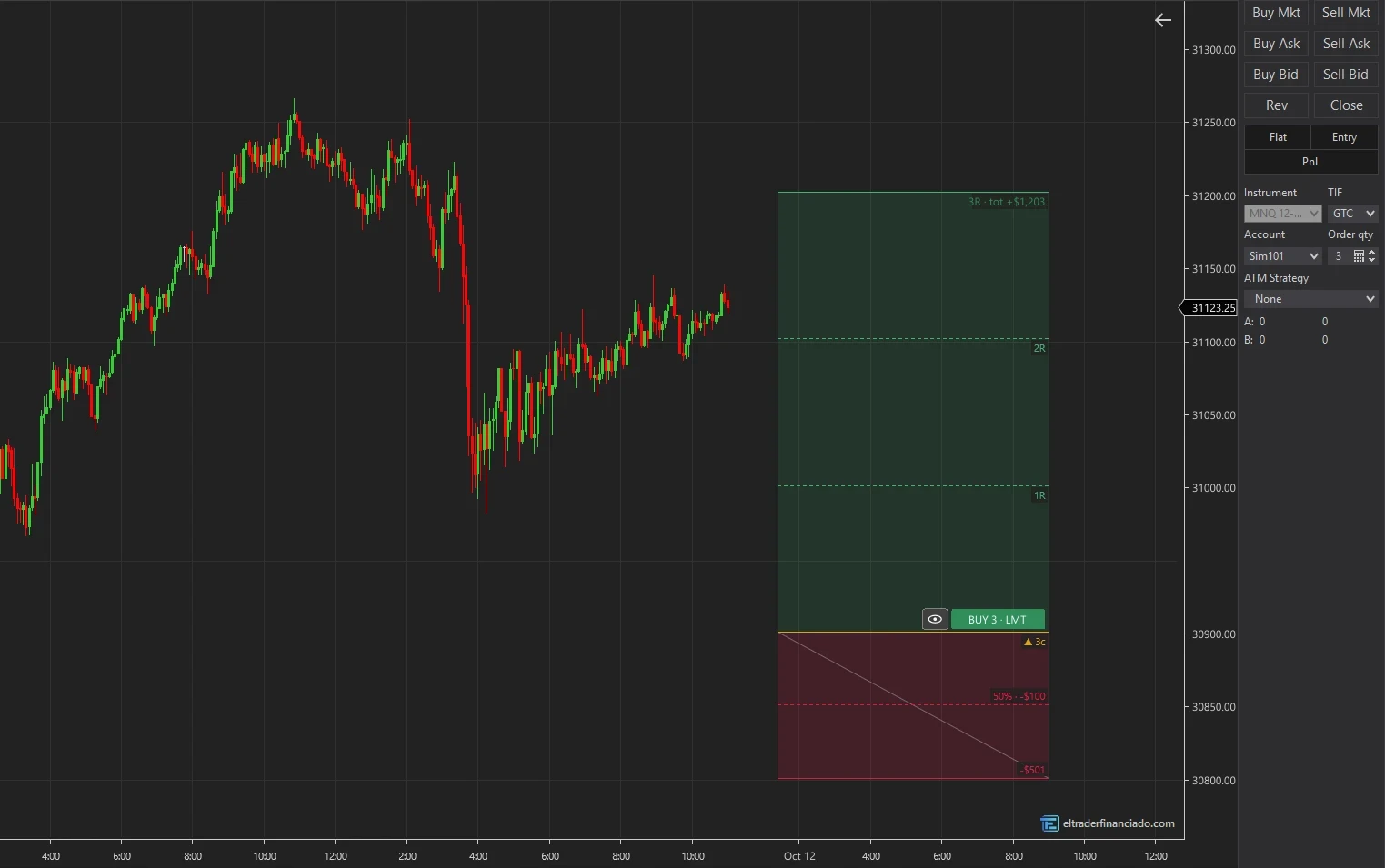
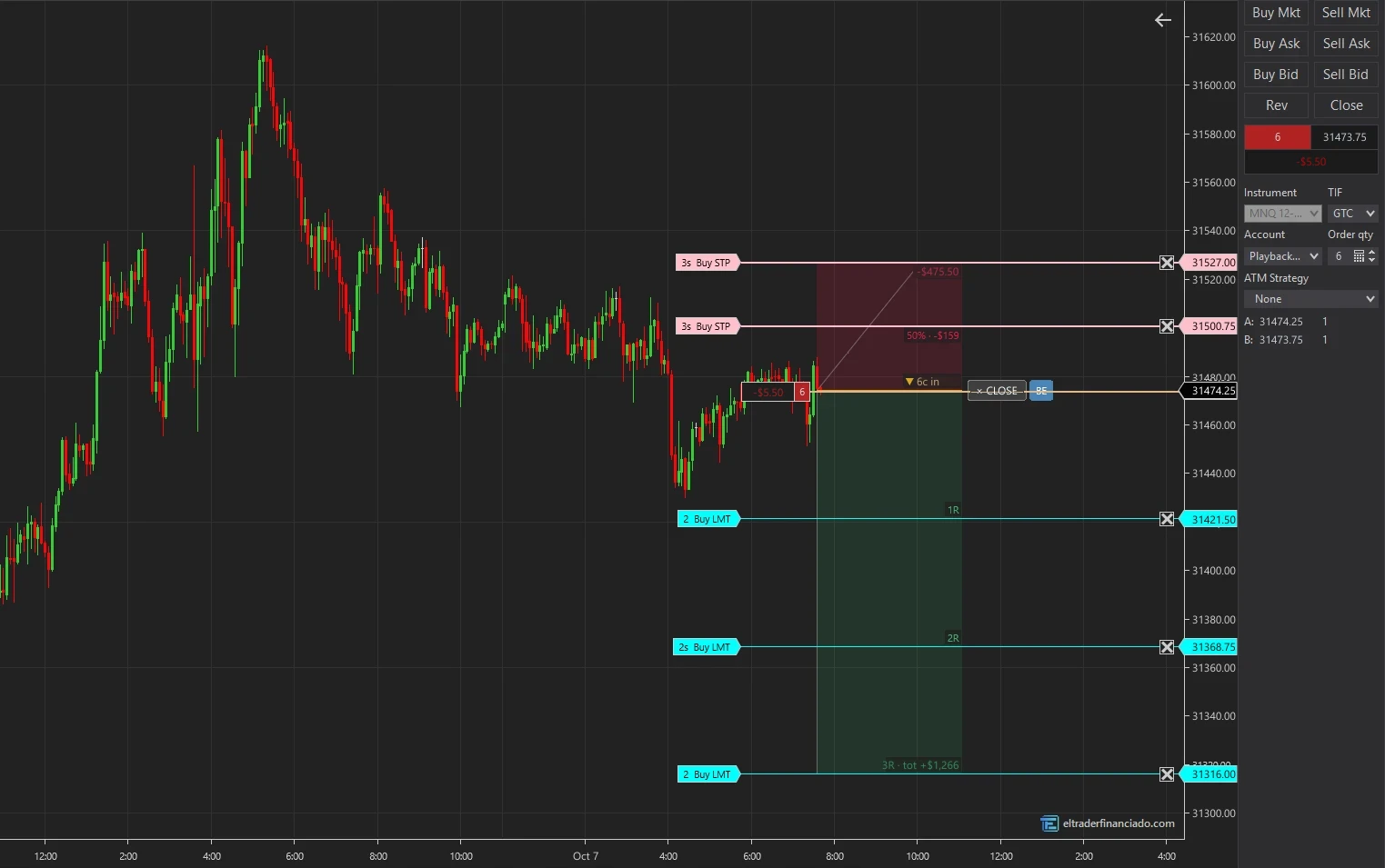
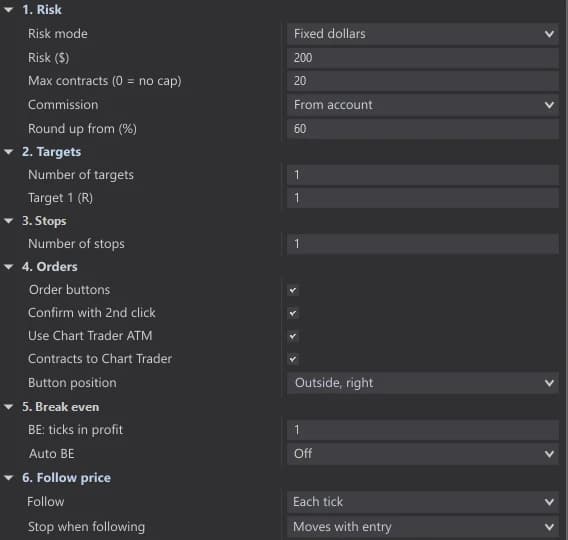
What the tool does
- Position size from your risk: the most contracts that fit, counting each contract with its own stop and the round-turn commission. If more than 60% of the next contract fits, it rounds up (configurable; at 100% it always rounds down).
- Up to 5 targets in R (0.5R, 1R, 1.5R…) and a partial stop at a % of the distance with its own % of contracts. Every line can be dragged.
- Buttons on the box to buy or sell (limit or stop depending on where the entry is), cancel, move to break even and close only what the box opened.
- With the Chart Trader ATM: it enters with your template and moves its orders onto the box lines, keeping its auto break even and trailing.
- Automatic break even after a target or at a % of the way, plus an eye button to make the entry follow price and enter at market.
- Short labels when not selected (contracts, dollars at risk and R) and full detail on hover; optional distances in ticks or points.
How many contracts to trade: the math the box does
Risking $200 with a 40-tick stop on MNQ ($0.50 per tick), each contract risks $20 plus commission (say $1.24 round turn): 9 contracts fit; without commission it would be 10. The box redoes that math every time you move the stop, also with two stops (each contract counts its own) and on any instrument, because it reads the tick value from the chart.
Ways to use it
The most common uses. Everything is set in the box properties (double-click).
Measure and enter with a limit
Draw the box at your level, set the stop at structure and click BUY or SELL twice. If price doesn't get there, move the box and the order follows; if not even one contract fits, the entry cancels itself.
Scale out
With 2 or 3 targets (for example 1R, 2R and 3R) and auto break even after the first one, you bank part at 1R and let the rest run risk-free.
With your usual ATM
Pick your ATM in the Chart Trader: the box enters with it and places its orders on the box lines. Your template's break even and trailing keep working.
Enter at market with the stop already measured
Click the eye: the entry follows price and you can drag the stop without stopping it. When you send, it enters at market and the box shifts to the actual fill price.
Worth knowing
The box won't improve your strategy: it makes every trade risk what you decided, with no hand math and no extra contracts in a rush. It's a beta and it sends real orders: try it first on Sim101 or Playback, and on a live account start with one micro.
Key settings
| Setting | Default | What it does |
|---|---|---|
| Risk mode | Fixed dollars | Dollars per trade or % of the account balance. |
| Risk ($) | 200 | What you risk per trade, commission included. |
| Max contracts | 20 | A cap even if the risk allows more (very tight stops). |
| Round up from (%) | 60 | 3.7 contracts → 4; 3.4 → 3. At 100, always round down. |
| Number of targets / stops | 1 / 1 | Up to 5 targets in R and one partial stop. |
| Use Chart Trader ATM | Yes | With None, the box places its own stop and targets as OCO. |
| Auto BE | Off | After a target or at a % of the way to target 1. |
| Button position | Outside, right | Outside right or left, inside or below the box. |
How to install ETFRiesgoBeneficio in NinjaTrader 8
- 1
Download the .zip and don't unzip it.
- 2
In NinjaTrader 8, from the Control Center: Tools → Import → NinjaScript Add-On… and pick the .zip.
- 3
Accept and wait for it to compile. If you had an earlier version, allow it to overwrite.
- 4
On the chart: right-click → Drawing Tools → ETF Risk-Reward (at the end of the list). You can assign it a key in Tools → Hotkeys.
Frequently asked questions
Does it send real orders?
Yes, on the account selected in the Chart Trader. Sending and closing ask for a second click to confirm, and CLOSE only closes what the box opened, never more than what's in the account. Try it on Sim101 or Playback first.
How is it different from NinjaTrader's Risk Reward tool?
NinjaTrader's tool only measures distance and ratio. This one sizes contracts for your dollar risk, includes commission, supports several targets and a partial stop, and sends and manages the orders from the box.
Does it work with prop firm accounts on Rithmic or Tradovate?
Yes, it uses the Chart Trader account whatever the connection. It's the part we've been able to test least in the beta: if something looks off on your connection, send us a screenshot.
What if I delete the box or restart NinjaTrader with an open trade?
A pending entry is cancelled so it can't fill without a stop. If you're already in, the stop and targets stay live in NinjaTrader but the box stops managing them; if any of its orders are left unmanaged, it warns you in red.
Can I use it just to measure, without sending orders?
Yes. Turn off "Order buttons" in the properties: the box sizes the position and writes it into the Chart Trader, and you send orders as usual.
What if I enter from the Chart Trader instead of the box?
You enter with the right number of contracts, but the box doesn't manage that trade: it won't move the stop or targets to its lines, and its BE and CLOSE don't act on it. For the box to run the trade, always send with its buttons (with your ATM if you like).
Trying it in a futures prop firm?
We have discount codes for the main evaluations. They are affiliate links: we earn a commission if you buy through them.
More free indicators
Supply & Demand Zones
FreeSupply and demand zones with freshness, a 0-9 score breakdown and risk per contract in dollars.
Session Levels & Killzones
FreeICT killzones, Asia/Europe/US sessions, PDH/PDL, cash open and close, and liquidity sweeps.
These indicators describe what price has done; they don't predict what it will do and they are not investment advice. Only trade futures with money you can afford to lose.