Free SMT divergence indicator for NinjaTrader 8
An SMT divergence appears when two markets that normally move together stop doing so at an extreme: NQ prints a new high and ES doesn't. For ICT it's a sign that the high may be false.
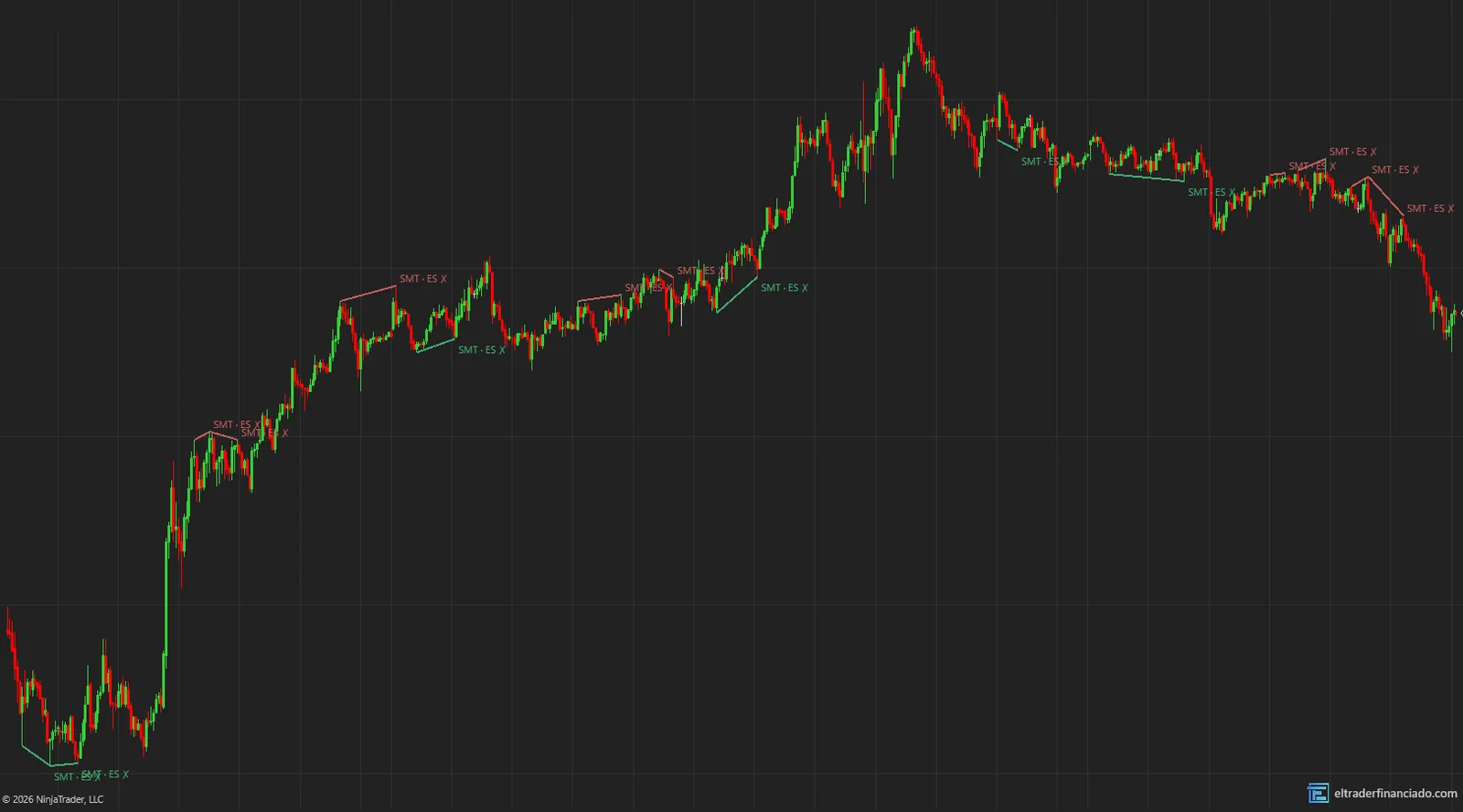
This indicator picks the pair by itself (NQ with ES, gold with silver), compares the swing highs and lows of both and marks every divergence on your chart.
- 100% free
- Open source (MIT)
- Built by El Trader Financiado for the community
Version 1.0 beta · NinjaTrader 8 · .zip to import · also in the pack of all 8
Install one language only: if you switch between English and Spanish, delete the ElTraderFinanciado folder first (Documents\NinjaTrader 8\bin\Custom\Indicators).
What the indicator draws
- Automatic pair: NQ with ES, YM and RTY with ES (same expiry), GC with SI (silver's nearest active month), and micros with micros.
- A line between the two chart highs (or lows) and the label "SMT · ES ✗", which marks the market that failed to make the new extreme.
- The last 10 divergences.
What an SMT divergence is
SMT stands for smart money technique. It relies on correlation: NQ and ES rise and fall together almost all the time. When one makes a higher high and the other doesn't, the move's strength isn't broad.
Read the full guide: what it is, rule-based strategies and common mistakesHow to trade SMT divergence
A summary of the most common uses. Entry, stop and target rules are in the guide.
SMT at a liquidity level
An SMT carries more weight when it shows up at a level the market was hunting.
What the evidence says
Divergence between correlated indices is real and measurable. That it anticipates reversals is an ICT thesis with no public studies backing it.
Key settings
| Setting | Default | What it does |
|---|---|---|
| Comparison instrument | Automatic | Type another one to force the pair. |
| Bars each side (swing) | 5 | Size of the highs and lows compared. |
| Tolerance between swings (bars) | 2 | Allowed offset between the two markets. |
| SMTs to show | 10 | The most recent ones. |
How to install ETFSMT in NinjaTrader 8
- 1
Download the .zip and don't unzip it.
- 2
In NinjaTrader 8, from the Control Center: Tools → Import → NinjaScript Add-On… and pick the .zip.
- 3
Accept and wait for it to compile. If you had an earlier version, allow it to overwrite.
- 4
On the chart: right-click → Indicators… → ElTraderFinanciado folder.
Frequently asked questions
What data do I need?
Your connection must provide data for both markets (for example, NQ and ES). It only works on minute or second charts.
Can I compare against another market?
Yes, type the instrument in "Comparison instrument", for example ES 12-26.
Trying it in a futures prop firm?
We have discount codes for the main evaluations. They are affiliate links: we earn a commission if you buy through them.
More free indicators
Session Levels & Killzones
FreeICT killzones, Asia/Europe/US sessions, PDH/PDL, cash open and close, and liquidity sweeps.
Market Structure & Order Blocks
FreeBOS, CHoCH and MSS with real displacement, and the active order blocks behind each break.
These indicators describe what price has done; they don't predict what it will do and they are not investment advice. Only trade futures with money you can afford to lose.